België / Belgique
 България
 Κύπρος
 Deutschland
 España
 France
 Italia
 Magyarország
 Nederland
 Österreich
 Polska
 România
 Česko
 Ελλάδα
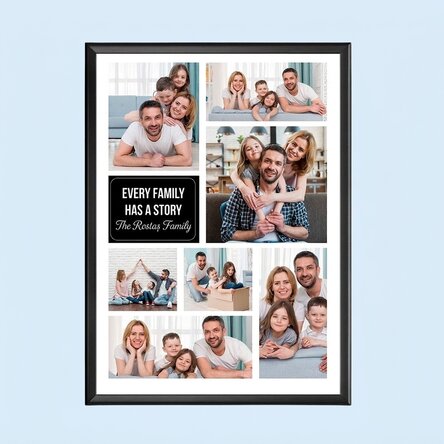
Personalised canvas with 6 photos, model number 9, and text message
a memorable gift
23.07 €
Product code: 9637
Product code: 9637


You might also be interested in ...


Product description
Portraits aren't the only thing that's trendy. Go for a landscape shot!
A landscape photo, as the name suggests, is way better for capturing scenery, 'cause it can frame nature better. However, this type of photo is also unique for frames with people, especially if you want to include as many characters as possible in such a photo or simply want to place two characters in a memorable natural context.
What can I customise?
The print can be customised with photos and text.
How can I customise it?
Step 1: Click on the "Customise" button
Step 2: Click on a sample photo and then click on the green button at the bottom "Upload photos" (The images will be saved for later use)
Step 3: Select the photos from your computer, phone or tablet. The upload will start immediately.
Step 4: Choose a section of the product where you want to use the image.
Step 5: Choose the photo you want to appear in the selected section.
Step 6: If necessary, you can edit the photo by changing its position, zoom or rotation.
Step 7: When you are satisfied with the result, click on the "Confirm" button and continue with the next photos.
Step 8: Click on the sample text and edit the custom message.
Step 9: Once you have finished customising, click on the "Finish" button, choose the product format and add the product to your basket.
Note:
Black, white, red and gold frames: glass + plastic frame.
Aluminium frame: glass + aluminium frame.
A landscape photo, as the name suggests, is way better for capturing scenery, 'cause it can frame nature better. However, this type of photo is also unique for frames with people, especially if you want to include as many characters as possible in such a photo or simply want to place two characters in a memorable natural context.
What can I customise?
The print can be customised with photos and text.
How can I customise it?
Step 1: Click on the "Customise" button
Step 2: Click on a sample photo and then click on the green button at the bottom "Upload photos" (The images will be saved for later use)
Step 3: Select the photos from your computer, phone or tablet. The upload will start immediately.
Step 4: Choose a section of the product where you want to use the image.
Step 5: Choose the photo you want to appear in the selected section.
Step 6: If necessary, you can edit the photo by changing its position, zoom or rotation.
Step 7: When you are satisfied with the result, click on the "Confirm" button and continue with the next photos.
Step 8: Click on the sample text and edit the custom message.
Step 9: Once you have finished customising, click on the "Finish" button, choose the product format and add the product to your basket.
Note:
Black, white, red and gold frames: glass + plastic frame.
Aluminium frame: glass + aluminium frame.
Reviews
Write a review
Reviews
Write a review
Verified buyer
Personalised canvas with 6 photos, model number 9, and text message
Sunt extrem de placut impresionata de fiecare data de rapiditatea comenzilor, de calitatea foarte buna a produselor si de atentia acordata detaliilor fiecarui produs in parte. Va multumesc !
Laura, Romania
Verified buyer
Personalised canvas with 6 photos, model number 9, and text message
Arată că xact că în poza și pentru promptitudine.
Ana, Romania
Verified buyer
Personalised canvas with 6 photos, model number 9, and text message
Claritate excelenta
Rotaru a, Romania
Verified buyer
Personalised canvas with 6 photos, model number 9, and text message
Sunt foarte multumit.
TEODOR, Romania
Verified buyer
Personalised canvas with 6 photos, model number 9, and text message
Calitate ridicată, promptitudine!
Stefan Mirela, Romania
Verified buyer
Personalised canvas with 6 photos, model number 9, and text message
Calitatea produsului si rapiditatea livrarii
Ciprian Jipa, Romania